

The information you need to collect from a software provider before signing up falls into seven groups: a written implementation scope, a data migration plan, integration details, a full cost breakdown, security terms, comparable customer references, and exit and support commitments. Get these in writing and implementation stops being a nightmare.
Key Takeaways
- Get a written implementation scope that names who does what, how long each phase takes, and what ‘done’ means before you pay anything.
- Request a data migration map and test a sample export from your current system, because migration is where many implementations stall.
- Confirm each integration as native, third-party automation, or API, and find out who fixes it when it breaks.
- Price the software over three years, including setup, training, support, and renewal increases, not just the monthly fee.
- Run a trial with real workflows, call a reference customer of similar size, and move every vendor promise into the contract.
- Boostly Connect syncs your existing PMS to a WordPress direct booking site in under 20 minutes, supports 8 PMS integrations, and has a free plan for up to 3 listings on the Discover map, so you can test every item on this checklist against a real product.
Software that looks simple in a demo can stall for months once your real calendars, guest records, and integrations get involved. In 2026, most vacation rental operators run several connected tools, and every connection is a place where setup can go wrong. Hostfully’s 2026 Vacation Rental Tech Stack Report shows marketing and analytics software adoption climbing from 23% among operators with 1 to 5 properties to 67% among those with 100 or more. The stack grows with your business, and so does the risk.
At Boostly Connect, we have built more than 700 websites for short-term rental hosts and property managers, and the smooth projects share one trait: the buyer collected the right documents before signing. Our founder, Mark Simpson, started the company in 2016 after recovering over $30,000 a year in platform fees himself, so we have sat on both sides of this table, as an operator and as a vendor.
This guide covers what to request, which written artifacts matter most, and how to judge the answers you get. Hold us to the same list when you evaluate our platform.
What Information Do You Need to Collect From a Software Provider Before Signing Up?
Before you sign, the provider owes you seven written items: an implementation scope, a migration plan, an integration list, a total cost breakdown, security and data terms, comparable customer references, and support and exit commitments. Collecting them turns a sales conversation into evidence you can compare across vendors.
A demo shows the best case, while a document shows what the provider will commit to. That gap explains why two vendors with matching feature lists can deliver very different implementations, and why a spoken ‘we can do that’ carries no weight once you have paid.
| Item to collect | What it protects you from | Red flag if the provider hedges |
|---|---|---|
| Written implementation scope | Surprise work and open-ended timelines | ‘It depends’ with no phases or owners |
| Data migration map | Lost reservations, guest records, and custom fields | No sample export or field mapping |
| Integration list | A tool that cannot talk to your PMS | Integrations that exist only on a roadmap |
| Three-year cost breakdown | Hidden setup and renewal charges | Only a monthly price |
| Security and data terms | Privacy exposure and locked-in data | No documentation for privacy or payment standards |
| Customer references | Overpromised timelines | A logo list but no calls |
| Support and exit terms | Being stranded after go-live | Vague response times and no data-return clause |
Most checklists stop at the question. We push one step further: for every question, name the artifact you should walk away with, such as a statement of work, a responsibility matrix, a field-level migration map, or written acceptance criteria. If the provider cannot produce the artifact, treat the answer as a hope rather than a promise.
When operators ask us for this package, our answer is short: connect your PMS, review your synced listings, and your direct booking site is live.
What Does Vacation Rental Software Do, and Which Type Fits Your Size?
Vacation rental software is a group of tools that automate booking, pricing, guest communication, and reporting for short-term rentals. A property management system (PMS) runs calendars and reservations, a channel manager distributes listings to Airbnb and Vrbo, and a direct booking website with a CRM captures guests you own.
Size changes what matters. With one or two listings, you mostly need a PMS that keeps calendars accurate and a direct booking site that converts. If you manage a single listing with very low volume and no interest in marketing, a simple DIY page may be enough. With a growing portfolio, integration depth, multi-property reporting, and automation outweigh any single feature.
Whatever you buy, check how it connects to the system you already use. Most operators run a PMS such as Hospitable, Hostfully, Lodgify, or Guesty, and any new tool must read from it without manual re-entry. Our overview of what to look for in a direct booking website covers the website layer in detail.
That is why we built Boostly Connect around 8 PMS integrations. You keep the system you run today and gain live availability and real-time pricing on a WordPress site you own.
What Does Implementation Involve, and Who Is Responsible for Each Step?
Software implementation is the work between signing and your first live booking: configuration, data loading, integration, testing, training, and go-live. Ask the provider for a written statement of work that assigns every task to their team or yours, with dates, so no step is left to assumption.
Request these four artifacts before you pay:
- Statement of work: named deliverables and the assumptions behind the price.
- Responsibility matrix: what you must supply (logins, photos, rate rules, policies), what the provider builds, and who approves each phase.
- Timeline tied to your setup: number of listings, integrations, and customization, not a single figure quoted to everyone.
- Acceptance criteria: the exact tests that prove each phase is finished.
Then ask one pointed question: what would make this take twice as long? An honest provider names data volume, custom requirements, or slow customer approvals. A vague answer means nobody has scoped your project.
In our experience, onboarding drags when the buyer’s own tasks are unassigned. We keep our scope short: connecting your PMS takes under five minutes, syncing it to your WordPress site takes under 20, and neither step needs a developer or any coding. After launch, twice-weekly group coaching calls led by industry experts cover training so it never becomes a separate project.

What Data Can You Export From Your Current Software, and How Will It Migrate?
A data export is a file of your reservations, guest records, listings, rates, and message history, downloaded from your current software in a usable format such as CSV. Before signing, request a migration map showing exactly which fields move, which are reformatted, and which are left behind.
Run your own test first. Download a sample export today, then ask the new provider to run that file through their import tool before you commit. You will see missing fields, duplicate guests, and date-format problems while you can still walk away.
Also ask who cleans the data, what they charge for it, and how guest consent fields carry over. In our experience, migration delays come from messy guest records far more often than from software limits.
With Boostly Connect, your PMS stays the source of truth, so you migrate nothing. We read availability and pricing from it, and every guest who books direct lands automatically in our CRM, which means no list to export or re-import. If you are weighing CRM options, our guide to the best CRM for short-term rental hosts who own their guest list explains what to look for.
Which Integrations Will Work, and Who Fixes Them When They Break?
An integration is a connection that moves data between two tools, and it comes in three forms: a native connector built by the vendor, a third-party automation tool, or an API your team configures. Ask which type each required integration uses and who owns the fix when it fails.
Ask for the full integration list in writing and mark every item as live or roadmap. A roadmap integration is not an integration. Then have the provider connect to a test copy of your PMS during the evaluation. API-first design is common in 2026, so request the documentation and find out whether the vendor or you are responsible for maintaining the connection.
Calendar sync errors are the costly failure here, because a stale calendar means a double booking and an unhappy guest. Pricing sync matters just as much, since your site must show the same rates your PMS does. Our explainer on real-time pricing on a vacation rental website shows what correct behavior looks like.
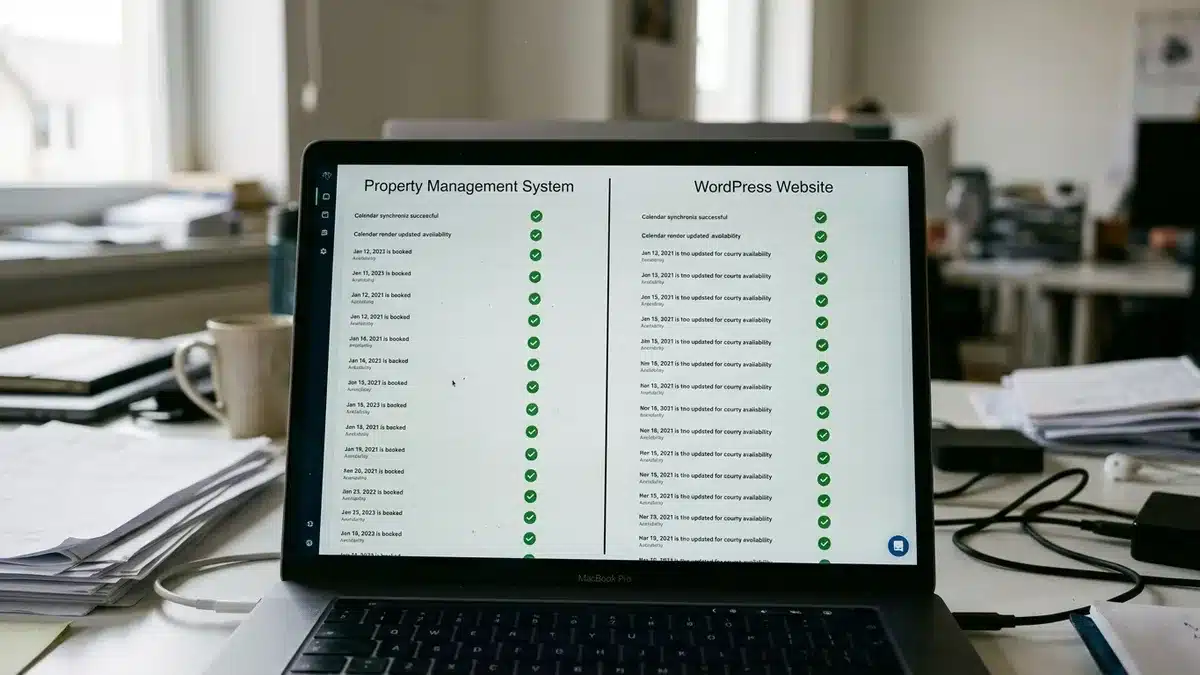
We designed Boostly Connect to remove the stitched-together plugin problem. Native connections to Hospitable, Hostfully, Lodgify, Guesty, and 23 other systems mean your PMS, website, and CRM operate as one connected layer, so you are not chasing sync errors by hand.
What Will Software Cost You Over Three Years, Not Just Per Month?
Total cost of ownership is the full price of software across a fixed period, typically three years, including subscription, setup, migration, integration work, training, support tiers, usage overages, and renewal increases. The monthly fee is only one line of that total, so a provider that quotes a single figure has not answered the question.
| Cost line | What to ask | Where it hides |
|---|---|---|
| Setup and configuration | Included, or billed as services? | Professional-services line items |
| Data migration | Who does it, and at what rate? | Import tools and cleanup hours |
| Integrations | Native, or a paid add-on? | Per-connection or API fees |
| Training | Included, or per session? | Custom or in-person sessions |
| Support | Which tier, hours, and response time? | Premium support upgrades |
| Usage and overages | Billed per listing, seat, or booking? | Minimums and overage rates |
| Renewal | Is there a cap on annual increases? | Auto-renewal clauses |
Add your own time to the total. Multiply the hours your team will spend in training and testing by their loaded hourly cost, and include any ongoing admin work. Then compare the result against what you lose to OTAs, which commonly charge 15 to 20 percent of every reservation. Our breakdown of how much Airbnb commission costs you per year makes that baseline concrete.
We price Boostly Connect with that comparison in mind: a free plan for up to 3 listings on the Discover map, so the first test of the system carries no sunk cost.
How Do You Test a Provider and Verify Its Claims Before Committing?
Verifying a software provider means checking its claims against real evidence: a trial on your own workflows and a reference call with a customer similar to you. Demos show the best case, while a trial of one to two weeks with real data and a candid reference call show the typical one.
During the trial, use real users and real listings. Include a failure test: revoke a user’s access, export all your data, and change a rate in your PMS to see how quickly the website reflects it. A provider that resists these tests is telling you something.
On the reference call, ask for a customer with a similar portfolio size and use case, then ask:
- How long did implementation take compared with the quote?
- What did it cost beyond the original estimate?
- What blocked you, and who administers the system now?
- What would you do differently?
We welcome this scrutiny. One bed and breakfast we work with reached 90 percent direct bookings and 60 percent repeat guests, and our guarantee is plain: clients reach 65 percent direct bookings within 12 months, or we work for free until they do.

How Do You Check Security, Guest Data Ownership, and Exit Terms?
Security and data ownership checks confirm who can access your guest and payment data, where it is stored, and how you get it back if you leave. Request the provider’s privacy policy, data processing terms, and payment-card documentation before you sign, not after.
Providers that store guest personal data generally need to address privacy regimes such as GDPR and CCPA, and platforms that handle card data fall under PCI DSS. Ask for their documentation and confirm what applies to you with your own legal adviser. Then ask about admin roles, multi-factor sign-in, audit logs, data location, and subprocessors.
Exit terms deserve equal attention. Ask in what format your data is returned, how quickly, and whether any exit fee applies. A 2022 Enso Connect Inc. finding put the share of property managers not collecting guest data at 22.2%, which shows how many operators never secure the asset they most need to take with them.
Ownership is the heart of why we built our CRM. Contact data from every direct booking stays with you instead of sitting inside Airbnb for remarketing to competitors. For the practical steps, see our guide on how to own guest data from Airbnb, and our post on how to re-engage past vacation rental guests shows what you can do with that data once you hold it.
What Belongs in the Contract and the Go-Live Plan?
A software contract is where vendor promises become enforceable, so every answer you collected should appear in it as a named deliverable, date, or measurable standard. Spoken assurances during a sales call carry no weight once the agreement is signed.
Put these items in writing:
- Named deliverables and milestone dates, with remedies for missed milestones.
- The assumptions behind the price, plus the hourly rate for change orders.
- Acceptance criteria and a rollback plan if go-live fails.
- Hypercare: how long after launch you receive priority help, and what it covers.
- Service levels, with a named escalation path for outages.
- A cap on annual price increases and a data-return clause.
Support after launch deserves as much attention as setup. Our twice-weekly group coaching calls and more than 80 hours of marketing training keep help flowing after go-live, which is the period when most operators feel alone.
Which mistakes cause the most painful implementations?
- Signing on the strength of a demo with sample data.
- Skipping the reference call because the vendor’s website looks polished.
- Accepting ‘coming soon’ as an integration.
- Ignoring your own team’s hours when you calculate cost.
What Is the Safest Way to Sign Up With a Software Provider?
The safest approach relies on documents rather than demos: a written scope, a migration map, a verified integration list, a three-year cost view, references, security terms, and exit rights. Providers who produce these quickly usually implement quickly too. As automation and AI tooling spread through short-term rental software in 2026 and beyond, that paper trail only grows more valuable.

If you want to see what a clean implementation looks like, book a demo with Boostly Connect. We can have your listings synced and your direct booking site live in under 20 minutes, with no developer, no code, and a free plan for up to 3 listings on the Discover map. Bring this checklist and test every item against your own property data.
Frequently Asked Questions
Is there software that can streamline booking management for my short-term rentals?
Yes. A PMS centralizes calendars, reservations, and guest messaging, and a channel manager pushes availability to Airbnb and Vrbo to cut double bookings. A direct booking website synced to your PMS adds live availability and real-time pricing for guests who book with you. Boostly Connect covers that last layer with 8 PMS integrations.
What does vacation rental property management software do?
It automates the daily work of running short-term rentals: syncing calendars, processing reservations, sending guest messages, and reporting revenue. Some systems add pricing tools and owner statements. Check which of those functions you need before comparing vendors.
What is the best short-term rental software for small operators?
The best fit is the smallest system that keeps calendars accurate, captures guest contact details, and connects to tools you already own. Avoid paying for portfolio features you will not use for some time. Boostly Connect has a free plan for up to 3 listings on the Discover map, which suits owners with one to a handful of properties.
What data can I export from my current rental software?
Most systems let you export reservations, guest records, listings, and rates as spreadsheet files, but message history and custom fields vary by provider. Download a sample export before you sign and ask the new provider to map each field. Export options change, so confirm the current list in your provider’s documentation.
How long should software implementation take?
It depends on your number of listings, integrations, customization, and how available your team is, so distrust any single timeline quoted to everyone. Ask for phases and dates in a statement of work. For comparison, Boostly Connect connects a PMS in under five minutes and syncs it to a WordPress site in under 20.
What percentage does Airbnb take?
OTAs such as Airbnb and Vrbo commonly take 15 to 20 percent of each reservation. The exact structure depends on how your account is set up, so check Airbnb’s current fee page. That commission is the baseline to compare any software subscription against.
Do I have to stop using Airbnb to add a direct booking website?
No. Most hosts run both at once and simply redirect repeat guests to their own site. Adding Boostly Connect does not require removing or changing your OTA listings.